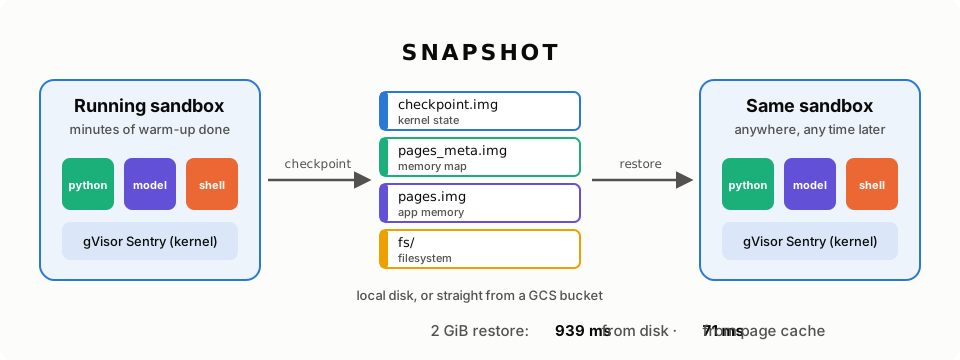
runsc checkpoint saves the full state of a gVisor sandbox to files: every
process, every open file, every socket, and the application’s memory.
runsc restore brings it back, on the same machine or on a different one, and
the applications continue as if nothing happened.
This feature is not new. gVisor could checkpoint a sandbox in 2018. But the 2018 version was slow, and some people still think of gVisor checkpoint/restore that way. A lot changed in the last few years. In our tests below, restoring a 2 GiB sandbox from a slow disk went from 5,106 ms to 939 ms, about 5 times faster, saturating the max speed of the disk. When the image is already in the host page cache, it went from 651 ms to 71 ms.
Why checkpoint a container at all?
Many workloads spend a long time getting ready before they do useful work:
- An LLM server loads tens of gigabytes of model weights, then runs
torch.compileand captures CUDA graphs. A snapshot saves the result of all of this work. - A Python or JVM app imports libraries and JIT-compiles hot code.
- An AI agent sandbox installs tools, clones a repository, and builds it.
- A reinforcement-learning environment needs thousands of identical, fresh copies of the same start state (Tencent wrote about running millions of these sandboxes with gVisor).
With checkpoint/restore, you do the warm-up one time, save it, and then restore the warm sandbox as many times as you want. The restore is only useful if it is fast. If the whole restore sequence, including fetching the snapshot, takes longer than a cold start, nobody will use it.
Why gVisor is good at this
In a normal container, the state of your application lives in the host Linux kernel, spread across thousands of kernel data structures. A tool that runs outside the kernel must read all of that state through many different kernel interfaces, and then rebuild it exactly on restore. CRIU does this well for normal containers, but it is hard work.
gVisor is different. Its kernel, the Sentry, is a normal Go program that runs in user space. All the kernel state of the sandbox (tasks, file descriptors, sockets, timers, memory mappings) is held in Go objects inside one process. To save a sandbox, gVisor does these steps:
- Pause all application threads.
- Walk the graph of kernel objects and write it to a file.
- Write the application memory to a file.
To restore, gVisor reads the files, builds the objects again, and resumes the threads. Because the Sentry owns all of this state, it can read and rebuild it directly, without any special support from the host kernel.
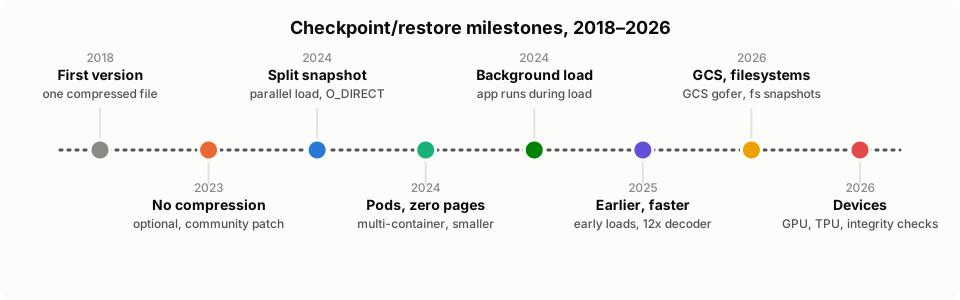
Saving the state was the easy part. Most of the work since 2018 has gone into making restore fast.
2018: One big compressed file
The first version of runsc checkpoint
(2018) wrote everything
into one file, checkpoint.img. Kernel objects and application memory were
mixed together in one stream, and the whole stream was compressed with flate
(DEFLATE, the same algorithm that zip and gzip use).
The file is small. But a restore must:
- Read the file from the start to the end, in order.
- Decompress every byte on the CPU.
- Build the kernel and fill the memory one after the other.
Nothing can happen in parallel, and nothing can be skipped. The application starts only after the last byte is done.
2023: Optional compression
Compression sounds like a good idea: a smaller file is faster to read, right? In practice, the answer was often “no”:
- Application memory, such as model weights or encrypted data, does not compress well.
- Decompression uses a lot of CPU time on the restore critical path.
- The decompression buffers stay in memory long after the restore. One production user measured up to 2x memory overhead and hundreds of milliseconds of extra startup time.
That user, Ivan Prisyazhnyy, sent a
community patch that made
compression optional with --compression=none. It was a small change, but it
opened the door to every step below. An uncompressed file has a very useful
property: you can read any part of it, at any time, in any order.
We measured the trade-off on today’s gVisor, with 2 GiB of app memory:
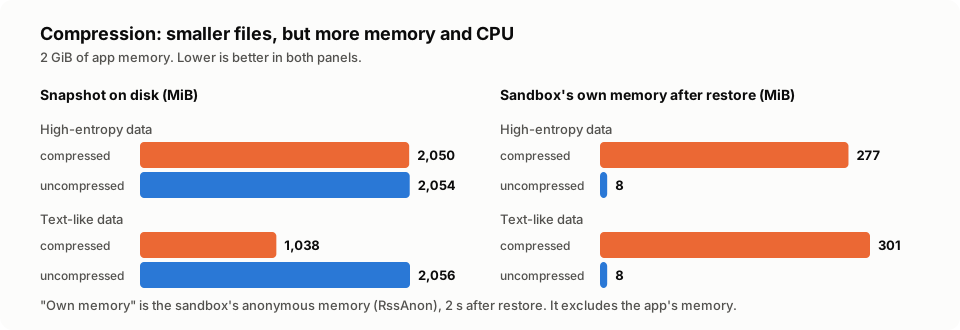
- High-entropy data, such as model weights, does not get smaller. You pay for compression and get nothing back.
- Text-like data gets about 2x smaller. That is real, if disk space or bandwidth is your main problem.
- Either way, the sandbox keeps about 300 MiB of extra memory after the restore, against 8 MiB without compression. The save also takes about 1.7 times longer.
Compression is still available (--compression=flate-best-speed) for the cases
where disk space or network bandwidth matters most. But it turns off the steps
below, and those steps are where the big wins are.
2024: Split the snapshot
Next, we split the single file by job (pages file, metadata file):
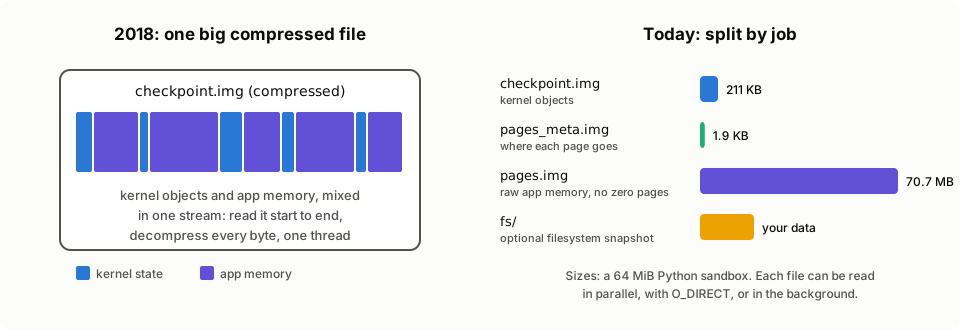
checkpoint.imghas the kernel objects. It is small, usually kilobytes to a few megabytes.pages_meta.imgtells gVisor where each page of memory goes.pages.imghas the raw application memory. It is big, and it is uncompressed, so gVisor can read any range of it directly into place.
This split made three new things possible:
Parallel load. Loading the kernel needs CPU time. Loading memory needs disk
bandwidth. The two do not depend on each other. Now gVisor
does them at the same time,
so the restore takes max(kernel, memory) instead of kernel + memory. The
save side does the same.
Direct I/O. With runsc checkpoint --direct and
runsc restore --direct-io=on, gVisor writes and reads pages.img with
O_DIRECT (restore,
checkpoint). The data
skips the host page cache. Use it if you restore an image only one time. Then
the restore does not fill the host page cache with data that nobody reads again.
If you restore many sandboxes from the same image, leave direct I/O off: the
page cache is what makes the second and later restores fast. With --direct,
runsc checkpoint is also slower: it returns only after the data is on disk,
not as soon as it is in the page cache.
Many readers, but not too many. Memory is read by a pool of parallel readers. In 2026 Shayon Mukherjee tuned this pool, and found that more readers is not always better. With 128 readers on a 64-CPU machine, 77% of the Sentry’s CPU time went to lock contention in the host kernel. With 12 readers, warm restores became 31% to 49% faster for Go, Python and Java apps, and used 56% to 91% less CPU.
2024: Multi-container and zero pages
Real sandboxes often have more than one container, such as a Kubernetes pod with an app and a sidecar. Multi-container restore saves the whole pod in one checkpoint. You then restore each container by name, and gVisor connects the container IDs and host files again.
The same year, gVisor also became smarter about zero pages. Many apps, especially ML apps, allocate big buffers and fill only part of them. A page of zeros does not need to be saved: on restore, it can come back as fresh, empty memory.
gVisor always checks for zero pages at save time, but only among pages it is not
yet sure are in use. Once gVisor knows a page is in use, a normal save writes it
without looking at its contents. gVisor learns this, for example, when something
asks for the sandbox’s memory statistics (reading /proc/meminfo or cgroup
memory files, which container runtimes do to collect metrics), after an earlier
save, or when the sandbox was itself restored from a checkpoint. Apps that write
zeros into large buffers, such as ollama, can end up with gigabytes of these
pages.
--exclude-committed-zero-pages
(commit) tells gVisor to
also check these pages at save time, and to leave out the ones that are all
zeros. Our test app had 512 MiB of data and 2 GiB of zeros:
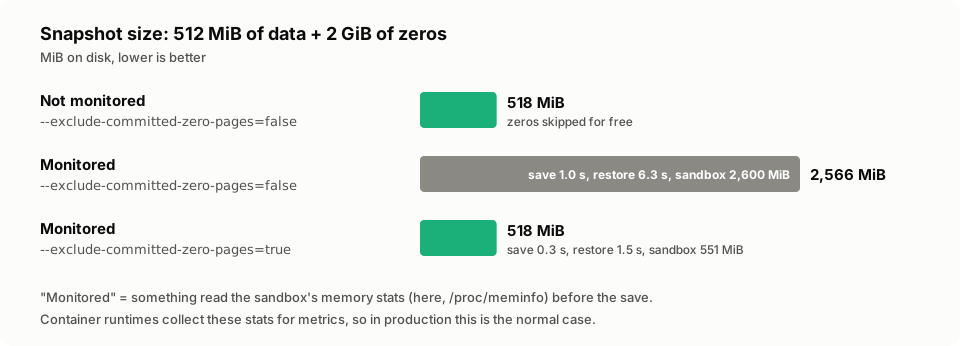
For a monitored container, the flag made the snapshot 5 times smaller. The save was faster too, because there was less to write. The restore was 4 times faster, and the restored sandbox used 2 GiB less host memory, because the zero pages come back as empty memory that uses no space. Since release-20261102.0, the flag is on by default.
2024: Background page loading
Until now, the app started only after all memory was loaded. But an app does not need all its memory at once. It needs the next instruction, the next few pages of heap, and the stack. Most of the other pages can wait.
With runsc restore --background
(commit), gVisor starts
the app as soon as the kernel objects are loaded. Memory keeps loading in the
background, while the app runs:
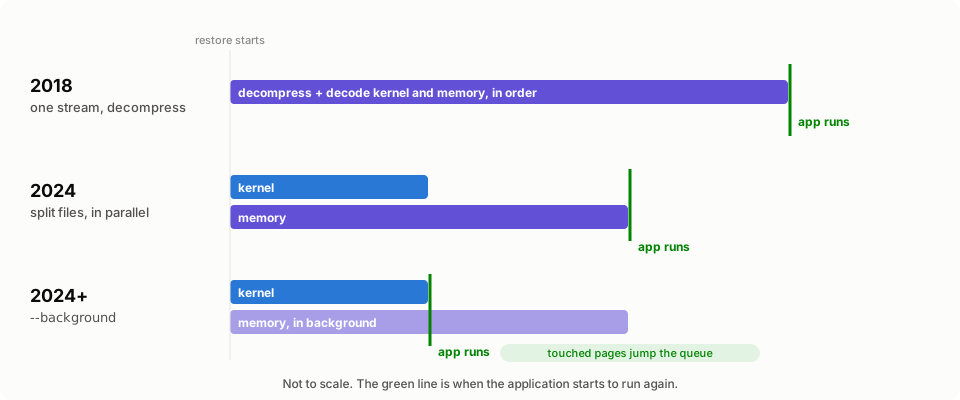
What happens if the app touches a page that is not loaded yet? gVisor moves that
page to the front of the queue, loads it at high priority, and lets the thread
continue. The app waits only for the pages that it really uses, not for the full
image. The restore time goes from max(kernel, memory) to just kernel.
2025: Early loading and a faster decoder
The faster the kernel loads, the sooner --background can start the app. So we
went looking for slow parts:
- Start reading memory earlier. gVisor now starts reading pages as soon as the sandbox starts to restore, and in 2026 even earlier, before it reads the kernel state.
- A faster decoder. A checkpoint of an SGLang server that ran
gemma-3-27bhad 368,245 kernel objects. The decoder rescanned a long list of pending objects 238,102 times to find the next one to finish. One small data-structure change (keep a separate list of the objects that are ready) cut the kernel load time from 2 minutes 30 seconds to 12 seconds. In 2026, a new state engine went further. On our test machine, a kernel state of a similar size (369,055 objects) now loads in 522 ms, against 1,895 ms with the previous engine. The objects of a real server take longer to decode than the ones in this test, so we estimate that the SGLang checkpoint itself would now load in about 1.5 to 3 seconds.
2026: GCS and filesystem snapshots
Two features made checkpoints easier to move around:
Restore straight from Google Cloud Storage. If the --image-path directory
has a gcs_opts.json file, gVisor
reads and writes the checkpoint in a GCS bucket.
A separate helper process, the checkpoint gofer, talks to GCS and reads the data
directly into the sandbox memory. The image does not need to be copied to the
local disk first. The helper is a separate binary, so the HTTP and cloud code
stays out of runsc and out of the sandbox.
Filesystem snapshots. A container is more than memory: it also has files
that it wrote. gVisor can save its in-memory root filesystem overlay and tmpfs
mounts as part of the checkpoint. With
runsc fscheckpoint and
--fs-checkpoint-paths, you can also save only the filesystem, and restore
it into a brand new container with runsc create --fs-restore-image-path.
And in 2026 --compression=none became
the default, so every user
gets the 2024 and 2025 improvements without extra flags. In release-20261102.0,
background page loading and zero-page exclusion
became defaults too.
2026: GPU checkpoint/restore
For a GPU app, much of the state that matters is on the GPU: model weights in GPU memory, CUDA contexts, and CUDA graphs that took minutes to capture. A memory snapshot of the sandbox does not include it.
NVIDIA’s cuda-checkpoint tool can
move the GPU state of a CUDA process into host memory, and back again. gVisor
now runs it automatically
when you pass runsc checkpoint --cuda-checkpoint-path, with the path of the
tool inside the container:
- Before it pauses the sandbox, gVisor finds every CUDA process and runs
cuda-checkpointon all of them in parallel. Their GPU state moves into normal process memory. - The normal checkpoint then saves that memory with everything else.
- On restore, after the kernel is back, gVisor runs
cuda-checkpointagain to put the state back on the GPU.runsc restoreneeds no extra flags.
The integration is fully open source, and works with gVisor’s existing GPU
support. GPU checkpoint/restore is not yet available on arm64, because
cuda-checkpoint does not support it.
2026: TPUs and more
Some newer additions:
- TPUs. Checkpoint/restore works with TPU devices through TPUproxy.
- The app can save itself. The app often knows the best time for a
checkpoint, for example immediately after it loads its model. With
app-driven checkpointing,
the app starts the checkpoint itself through a special file,
/proc/gvisor/checkpoint. The same file tells the app when the checkpoint is complete, and whether it is the original copy or a restored copy. Then the app can do different tasks after a save and after a restore, for example connect to its database again. To use this feature in a container, set OCI annotations. - Integrity checks. If a checkpoint has a hash key, gVisor verifies each chunk of up to 1 MiB before it uses the data, and fails closed if the data does not match.
- More devices. Sandboxes with host networking (apps reconnect after restore) and TUN devices can be saved and restored too.
The results
We ran a Python app with 2 GiB of high-entropy memory (random bytes), like model
weights, then we checkpointed it, deleted it, and restored it. We measured the
time until the app runs again: its first output after the restore.
(runsc restore --detach can return before that point.)
All runs use the same machine and the same runsc binary. We only change the
flags, to turn each step on or off.
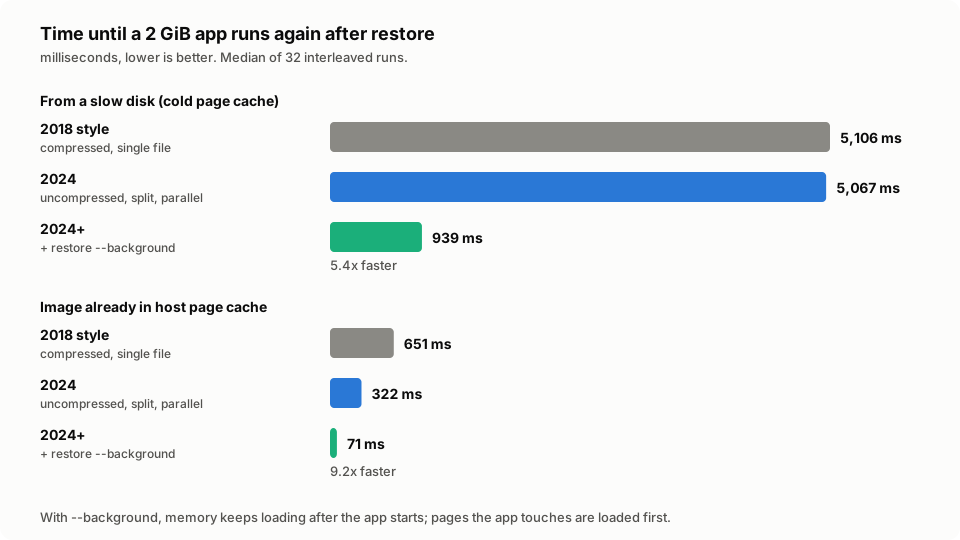
A few things to note:
- Split files are about as fast as the disk. 5,067 ms is close to the 4,750 ms this disk (about 450 MB/s) needs to read 2 GiB. On fast storage, the CPU cost of decompression becomes the biggest part: with the image in the page cache, the compressed restore takes 651 ms, against 322 ms for split files.
--backgroundremoves the disk from the critical path. The app runs again in 939 ms, even though the disk is just as slow. Memory keeps loading behind it. That is about 5.4 times faster than the 2018 format on the same slow disk.- Restoring many copies is even faster. Once the image is in the host page cache (after the first restore, or right after a checkpoint), the next restores take 71 ms. This is why you leave direct I/O off when you restore many sandboxes from one image.
The save side also improved: the same 2 GiB checkpoint took 1,129 ms with compression and 674 ms without.
One caveat: --background cannot make the disk faster. In our test, an app that
reads all 2 GiB of its memory right after the restore still has to wait for the
disk to deliver it. But most apps need only a part of their memory to start
serving, and those apps get a large benefit.
Speed is not the only thing that improved. Some steps save memory or disk space instead. Here is a summary of what we measured, with 2 GiB of app memory:
| Optimization | What it saves | Without | With |
|---|---|---|---|
| No compression | memory after restore | 277 MiB | 8 MiB |
| Zero pages, monitored app | snapshot size | 2,566 MiB | 518 MiB |
| Zero pages, monitored app | host memory after restore | 2,600 MiB | 551 MiB |
Test setup:
- 32 vCPU Google Cloud VM, Linux 7.0, disk at about 450 MB/s.
- gVisor release-20261102.0, systrap platform, with every flag set explicitly.
- A Python app with 2 GiB of random data in memory.
- Times: median of 32 interleaved runs. All differences are significant (Mann-Whitney U, p < 0.01).
- Memory and size numbers: median of 3 runs.
- Kernel state decoding: a sandbox with 92,000 open tmpfs files (369,055 kernel objects), restored from the page cache. Median of 10 interleaved runs per engine.
- Cold host page cache unless noted.
Try it
# Save a running sandbox (and keep it running).
runsc checkpoint --image-path=/snapshots/warm --leave-running my-container

# Restore it. Memory loads in the background by default.
runsc restore --image-path=/snapshots/warm --detach \
  --bundle=/path/to/bundle my-new-container

# Optional: wait until all memory is loaded (for example, before you delete
# the image).
runsc wait --restore my-new-container
Some tips:
- Use the defaults: uncompressed split files, background page loading and zero-page exclusion, which is what you want.
- On releases before release-20261102.0, add
--backgroundtorunsc restoreand--exclude-committed-zero-pagestorunsc checkpoint. - Add
--direct-io=ontorunsc restore(--directon older releases) if you restore an image only one time.
The checkpoint/restore guide has all the details, including Docker, networking, GPUs, and app-driven checkpoints.
What’s next
We are not done. Some ideas we are looking at:
- Faster encoding and decoding of kernel data structures, so the kernel
state loads faster and
--backgroundcan start the app sooner. - Less eager prefetching of background memory, so memory the app does not need yet does not compete with the pages it is waiting for.
- Smaller downtime during save, so a running app pauses for a shorter time
when you checkpoint it with
--leave-running. - Incremental checkpoints, which save only the memory that changed since the last checkpoint.
- Sharing memory between restored copies, so 100 sandboxes restored from the same image do not need 100 copies of the same pages.
If gVisor checkpoint/restore was “the slow one” in your head, we hope this post updates that picture. Give it a try, and tell us how it goes on GitHub or the mailing list.